---
title: "Customer Agent: AI-Powered Subscriber Management Inside Cleeng"
description: "Cleeng Customer Agent brings AI subscriber management to D2C and streaming teams: instant account lookups, renewal checks and safe profile updates in one chat."
image: https://blog.cleeng.com/hubfs/How-Cleeng-Customer-Agent-Answers-Subscriber-Questions-in-Seconds.png
---
Products
What it does
[Core Subscriber Management and Billing](https://cleeng.com/subscriber-management-system) [Merchant of Record Payments, Tax and Compliance](https://cleeng.com/merchant-checkout-optimization) [ChurnIQ Smart and Predictive Churn Analytics](https://cleeng.com/products/subscription-churn-analytics) [Hi5 AI-Enhanced Customer Care](https://cleeng.com/customer-care-digital-subscriptions)
AI Products
[Cleeng AI Ask questions in plain language](https://cleeng.com/ai) [Cleeng MCP Server Connect Cleeng to your own AI tools](https://cleeng.com/ai/mcp) [Data Intelligence Enriched context for every subscriber](https://cleeng.com/ai/subscriber-data) [Trust & Governance Complete control and auditability](https://cleeng.com/ai/legal)
Solutions
By industry
[Streaming and OTT](https://cleeng.com/solutions/streaming) [Sports](https://cleeng.com/solutions/subscription-management-for-sports) [Wellness](https://cleeng.com/solutions/wellness) [Creators](https://cleeng.com/solutions/youtube-creators) [Gaming](https://cleeng.com/solutions/gaming) [Memberships](https://cleeng.com/solutions/memberships)
By scale
[Enterprise](https://cleeng.com/solutions/enterprise) [Small and Medium Businesses](https://cleeng.com/pro)
For partners
[Agencies & Integrators](https://cleeng.com/solutions/agencies) [B2B2C Platforms](https://cleeng.com/solutions/b2b2c-platforms)
Developers
[Launch Subscriptions](https://developers.cleeng.com/docs/launch-subscriptions) [Build with LLMs](https://developers.cleeng.com/docs/build-with-llms) [Integrate apps](https://developers.cleeng.com/docs/payments_on_mobile_tv_apps_intro) [System status](http://status.cleeng.com/) [Integrations Hub](https://cleeng.com/integrations-connectors) [Migration guide](https://cleeng.com/migrate-to-cleeng) [Certified Partner Program](https://publisher.support.cleeng.com/hc/en-us/articles/22272169788188-Cleeng-Certified-Partner-Program)
Resources
[Publisher Help Center](https://publisher.support.cleeng.com/hc/en-us) [Blog](https://blog.cleeng.com/) [Customer stories](https://cleeng.com/clients) [Events](https://cleeng.com/events) [Research & reports](https://cleeng.com/resources) [Demo Hub](https://cleeng.com/demohub)
[Pricing](https://cleeng.com/pricing)
[Login](https://srm.cleeng.com/auth) [Get started free](https://srm.cleeng.com/auth/register)
[Blog](https://cleeng.com/blog)
# Customer Agent: AI-Powered Subscriber Management Inside Cleeng
Subscriber Management & Pricing | Sebastian Boruch | Aug 13, 2026
## **TL;DR**
- Cleeng Customer Agent is an AI agent inside [Cleeng AI Assistant](https://cleeng.com/ai-assistant) that helps streaming and D2C subscription teams look up and manage subscriber accounts through natural-language conversation.
- It retrieves a customer by exact email, customer ID, or external ID, then answers directly: access, renewals, spend, transactions, upgrades.
- Profile fields can be updated through the conversation, but every change requires explicit confirmation first.
- Customer PII is masked before it reaches the model and restored only when securely rendered to an authorized user.
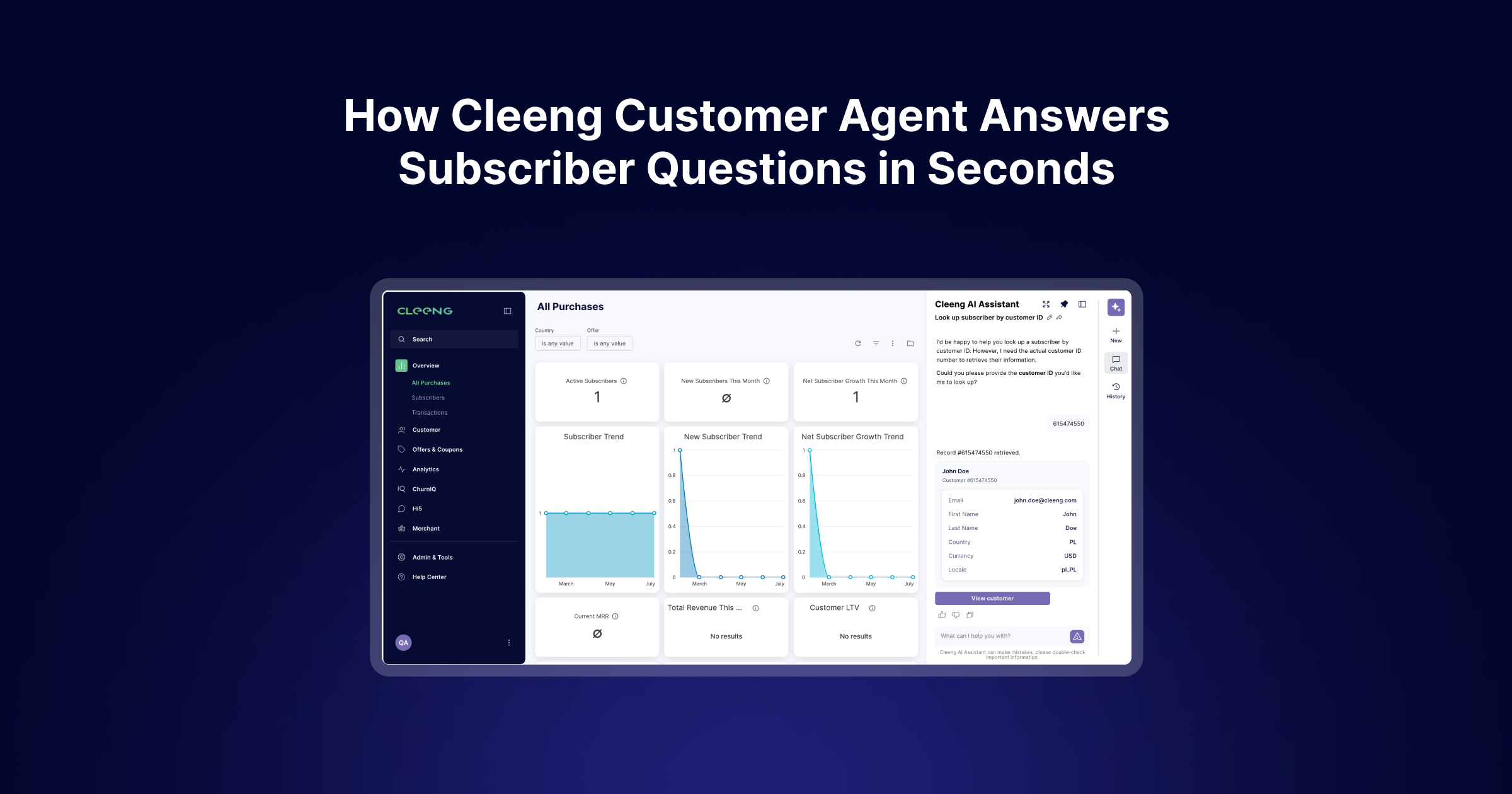
Cleeng Customer Agent is a specialized AI agent that helps streaming and D2C subscription teams look up and manage individual subscriber accounts through natural-language conversations.
Built into Cleeng AI Assistant, Customer Agent retrieves a customer using an exact email address, customer ID, or external ID, then answers questions about that customer's current access, subscriptions, passes, renewal dates, transaction history, lifetime spend, and subscription upgrades or [downgrades](https://blog.cleeng.com/how-to-re-engage-subscribers-at-the-cancellation-stage).
Selected account details can also be updated directly through the conversation. Before any change is applied, Customer Agent shows what's currently stored, explains exactly what will change, and requires explicit confirmation.
The result is a faster way to answer a common operational question: What is happening with this subscriber right now?
## Why AI subscriber management beats page-hopping
Managing subscription customers usually starts with a simple question: Does this customer have access? When does their subscription renew? Did they upgrade or downgrade? Answering normally means searching for the customer, opening their account, and moving between profile, subscription, and transaction views.
Cleeng's Customer Agent turns that into a conversation. A user can ask *"Look up the customer with email jane@example.com"* and get back a structured customer card: Customer ID, email, name, country, currency, locale, plus a direct **View customer** link into the full dashboard record for deeper investigation.
This kind of lookup work is exactly what's driving AI adoption in [subscription support](https://cleeng.com/customer-care-digital-subscriptions). Cleeng's 2026 analysis of support tickets across its streaming and D2C customer base found that billing-related inquiries account for 34% of subscriber support volume – even higher than the 20–30% typically cited industry-wide.
## What Customer Agent can tell you about a subscriber
Customer Agent answers individual customer questions using live Cleeng platform data, across five areas:
### **1. Access and content entitlement**
A direct yes-or-no on whether a customer has access right now, backed by the active subscriptions or passes – status, activation date, renewal/expiry date, price. *"Does customer 123456 currently have access?"*
*.webp?width=3474&height=1965&name=ai%20assistant%20close%20up%20view%20(2).webp)*
### **2. Renewal and expiry dates**
When a subscription renews or a pass expires, including cancellation-pending or non-renewing subscriptions. It reports the churn or access-end date – not the timestamp of the cancellation click itself.
### **3. Lifecycle facts**
First purchase (date and offer), last voluntary churn (offer and end date), and lifetime spend – total historical spend in the customer's account currency, calculated only from same-currency transactions so figures aren't mixed across currencies. This is historical spend, not predicted lifetime value.
### **4. Transaction history**
A structured table: date, offer, price with tax and currency, discount, campaign, payment method, up to 50 records per page, with a link to the full history.
### **5. Upgrades and downgrades**
Shown only when there's an authoritative subscription-switch record in the platform. Customer Agent doesn't infer plan changes by comparing unrelated transactions, keeping this record reliable rather than guessed.
## Can Cleeng's Customer Agent update subscriber information?
Yes – first name, last name, email, country, currency, locale, and external ID, all through conversation. But it doesn't apply an edit immediately. It first retrieves the current profile and shows the current value, the proposed value, and exactly which fields will change. The user must explicitly confirm before anything is applied; declining cancels the update and leaves the account untouched.
This confirmation is enforced through the tool protocol itself, not left to the model to remember. This is a hard boundary between answering a question and changing customer data. Every applied change is logged for audit purposes.
## How Customer Agent protects subscriber PII
Customer names, email addresses, and external IDs are masked before any data reaches the underlying model. Real values are restored only when the response is rendered securely to the authorized user inside Cleeng's interface.
Customer Agent also follows a strict citability rule: every factual value maps to a labelled field returned by a Cleeng tool. When information is missing, it says so instead of guessing.
## AI Subscriber management: direct answers first
Customer Agent is designed to lead with the answer, not a search narration. Ask whether a customer has access, and the response opens with a clear yes-or-no verdict – supporting subscription details follow alongside it. Ask when a pass expires, and the expiry date comes first. Ask about lifetime spend, and the total and currency are presented directly, with any relevant limitation noted after.
It also doesn't repeat values already visible in an accompanying customer card or table. That answer-first design is what actually saves time in a support case – not just having the data, but not having to dig through it to find the one number that matters.
## Who should use customer agent
- Support teams verifying access, renewals, and recent purchases mid-case
- Subscription ops teams reviewing lifecycle details and correcting profile data
- Account/partner teams pulling a fast picture of a single customer relationship
- Product/technical teams checking authoritative subscription switches against transaction data
## Get started with Customer Agent
[Open Cleeng AI Assistant from the dashboard](https://srm.cleeng.com/register) and enter an exact customer email, customer ID, or external ID. From there, ask about access, lifecycle, transactions, plan changes, or account information.
Still don't have a Cleeng account? Register now for free!
[](https://blog.cleeng.com/hs/cta/wi/redirect?encryptedPayload=AVxigLJov95pKO8KxssnxnxY3Bvv8In653cf%2F2OYI4iwgGB42FkwYRjSvSczPVzZccApkCvxt87LW65nFP22sOuVqRuwS7iyFZnfUQDkxmfMwk124WhGl8nDBVkeb8KAe8agkbJ5iraJifOLl8zcA%2B1pL78rn51Sk4aMFl7a40iikRhGfb3KP9qR8L1W3nsyHmfIhK1vVJRt&webInteractiveContentId=219096467054&portalId=5813983)
### Popular posts
#### [Seasonal Subscriptions: How Sports Streaming Platforms Beat Off-Season Churn Read more →](https://blog.cleeng.com/seasonal-subscriptions-for-sports-streaming)
#### [Why Every CTV Device Needs Different Payment Infrastructure Read more →](https://blog.cleeng.com/ctv-payment-infrastructure)
#### [Set Up or Migrate Your Subscription Service in Under 60 Minutes with Cleeng Pro Read more →](https://blog.cleeng.com/set-up-or-migrate-your-subscription-service-in-under-60-minutes-with-cleeng-pro)
#### [How to Drive Retention & Growth with In-Product Subscriber Engagement Read more →](https://blog.cleeng.com/how-to-drive-retention-growth-with-in-product-subscriber-engagement)
### Get started free
Create a free account to see what your subscription data could tell you – no credit card required.
[Start free](https://srm.cleeng.com/auth/register)
### Related posts
#### [ Churn & Retention Seasonal Subscriptions: How Sports Streaming Platforms Beat Off-Season Churn **Kamila Palka** · Sep 30, 2026, 7:33:48 AM](https://blog.cleeng.com/seasonal-subscriptions-for-sports-streaming)
#### [ Payments, Tax & Compliance Why Every CTV Device Needs Different Payment Infrastructure **Kübra Güven** · Mar 4, 2026, 12:17:55 PM](https://blog.cleeng.com/ctv-payment-infrastructure)
#### [ Subscriber Management & Pricing Set Up or Migrate Your Subscription Service in Under 60 Minutes with Cleeng Pro **Kamila Palka** · Sep 3, 2025, 11:23:48 AM](https://blog.cleeng.com/set-up-or-migrate-your-subscription-service-in-under-60-minutes-with-cleeng-pro)
Your Subscriber Retention Management® solution
[Contact us](https://cleeng.com/contact)
#### Ask AI for info
- [ChatGPT](https://chatgpt.com/?q=...)
- [Gemini](https://gemini.google.com/app?q=...)
- [Claude](https://claude.ai/new?q=...)
- [Perplexity AI](https://www.perplexity.ai/?q=...)
#### Products
- [Subscriber management and billing](https://cleeng.com/subscriber-management-system)
- [Merchant of Record](https://www.cleeng.com/products/merchant-of-record)
- [Churn Analytics](https://cleeng.com/churniq-churn-intelligence)
- [AI-Enhanced Customer Care](https://cleeng.com/pro)
#### Solutions
- [Streaming and OTT](https://www.cleeng.com/solutions/streaming)
- [Sports](https://cleeng.com/subscription-management-for-sports)
- [Wellness](https://cleeng.com/wellness)
- [Creators](https://www.cleeng.com/solutions/youtube-creators)
- [Enterprise](https://cleeng.com/solutions/enterprise)
- [Small and Medium Businesses](https://cleeng.com/pro)
#### Developer
- [API Reference](https://developers.cleeng.com/reference/apireference-overview)
- [Sandbox](https://srm-sandbox.cleeng.com/register)
- [Tutorials](https://developers.cleeng.com/docs/getting-started-with-cleeng)
- [Integrations](https://cleeng.com/integrations-connectors)
- [Migration](https://cleeng.com/integrations-connectors)
#### About
- [Company](https://cleeng.com/about-us)
- [Blog](https://blog.cleeng.com/)
- [Sustainability](https://cleeng.com/sustainability)
- [Careers](https://cleeng.com/careers)
#### Explore
- [Pricing](https://cleeng.com/pricingpro)
- [My Dashboard](https://srm.cleeng.com/login)
- [FAQ & support](https://publisher.support.cleeng.com/hc/en-us)
#### Customers
- [Who are Cleeng](https://cleeng.com/who-are-cleeng)
- [Get Support](https://cleeng.zendesk.com/hc/en-us/)
Copyright © 2026 Cleeng | All Rights Reserved | [Terms & Conditions](https://cleeng.com/master-service-agreement)
```json
{
"@context" : "https://schema.org",
"@type" : "BlogPosting",
"author" : {
"@type" : "Person",
"name" : "Sebastian Boruch"
},
"dateModified" : "2026-08-21T08:44:07Z",
"datePublished" : "2026-08-13T07:16:29Z",
"description" : "Cleeng Customer Agent brings AI subscriber management to D2C and streaming teams: instant account lookups, renewal checks and safe profile updates in one chat.",
"headline" : "Customer Agent: AI-Powered Subscriber Management Inside Cleeng",
"image" : "https://5813983.fs1.hubspotusercontent-na1.net/hubfs/5813983/How-Cleeng-Customer-Agent-Answers-Subscriber-Questions-in-Seconds.png",
"mainEntityOfPage" : {
"@id" : "https://blog.cleeng.com",
"@type" : "WebPage"
},
"publisher" : {
"@type" : "Organization",
"logo" : {
"@type" : "ImageObject",
"url" : "https://cdn.prod.website-files.com/624eb5c51026869311f0668a/66b09c7ffb2cada498b8a184_Cleeng%20logo%20-%20tagline%20bottom%20-%20transparent.svg"
},
"name" : "Cleeng"
}
}
```
```json
{
"@context": "https://schema.org",
"@graph": [
{
"@type": "BlogPosting",
"@id": "https://blog.cleeng.com/customer-agent-ai-powered-subscriber-management",
"headline": "Meet Customer Agent: AI-Powered Subscriber Management Inside Cleeng",
"description": "Cleeng Customer Agent brings AI subscriber management to streaming teams — instant account lookups, renewal checks, and safe profile updates in one chat.",
"url": "https://blog.cleeng.com/customer-agent-ai-powered-subscriber-management",
"datePublished": "2026-08-13",
"dateModified": "2026-08-13",
"author": {
"@type": "Person",
"name": "Kamila Palka",
},
"publisher": {
"@type": "Organization",
"name": "Cleeng",
"url": "https://cleeng.com",
"logo": {
"@type": "ImageObject",
"url": "https://5813983.fs1.hubspotusercontent-na1.net/hubfs/5813983/assets/cleenglogo.svg"
}
},
"mainEntityOfPage": {
"@type": "WebPage",
"@id": "https://blog.cleeng.com/customer-agent-ai-powered-subscriber-management"
},
"image": "https://blog.cleeng.com/hs-fs/hubfs/cleeng%20customer%20agent.webp?width=3600&height=1890&name=cleeng%20customer%20agent.webp",
"keywords": [
"AI subscriber management",
"AI agent for subscription management",
"conversational customer support",
"subscriber account lookup AI",
"AI customer service for subscription businesses"
],
"articleSection": "Product",
"about": {
"@type": "SoftwareApplication",
"name": "Cleeng Customer Agent",
"applicationCategory": "BusinessApplication",
"operatingSystem": "Web",
"isPartOf": {
"@type": "SoftwareApplication",
"name": "Cleeng AI Assistant"
}
}
},
{
"@type": "FAQPage",
"@id": "https://blog.cleeng.com/customer-agent-ai-powered-subscriber-management#faq",
"mainEntity": [
{
"@type": "Question",
"name": "What is Cleeng Customer Agent?",
"acceptedAnswer": {
"@type": "Answer",
"text": "An AI agent inside Cleeng AI Assistant that finds individual customers, reviews subscription and transaction information, checks access, and updates select profile fields through natural-language conversation."
}
},
{
"@type": "Question",
"name": "How can Customer Agent find a subscriber?",
"acceptedAnswer": {
"@type": "Answer",
"text": "By exact customer ID, email address, or external ID. It does not support name-only or fuzzy matching."
}
},
{
"@type": "Question",
"name": "Can Customer Agent check whether a subscriber has access?",
"acceptedAnswer": {
"@type": "Answer",
"text": "Yes, with a direct yes-or-no answer plus the active subscriptions or passes behind it."
}
},
{
"@type": "Question",
"name": "Can Customer Agent show renewal and expiry dates?",
"acceptedAnswer": {
"@type": "Answer",
"text": "Yes, including cancellation-pending or non-renewing subscriptions and when access will end."
}
},
{
"@type": "Question",
"name": "Can Customer Agent show transaction history?",
"acceptedAnswer": {
"@type": "Answer",
"text": "Yes, up to 50 transactions per page, including date, offer, price, discount, campaign, and payment method."
}
},
{
"@type": "Question",
"name": "Can Customer Agent identify upgrades and downgrades?",
"acceptedAnswer": {
"@type": "Answer",
"text": "Yes, using authoritative subscription-switch records only. It does not infer changes from transactions."
}
},
{
"@type": "Question",
"name": "Can Customer Agent update customer information?",
"acceptedAnswer": {
"@type": "Answer",
"text": "Yes, including name, email, country, currency, locale, or external ID, always with explicit confirmation before any change is applied."
}
},
{
"@type": "Question",
"name": "Can Customer Agent cancel subscriptions or issue refunds?",
"acceptedAnswer": {
"@type": "Answer",
"text": "No. Customer Agent cannot modify subscriptions or payments, delete customers, or issue refunds."
}
},
{
"@type": "Question",
"name": "Does Customer Agent expose personal information to the AI model?",
"acceptedAnswer": {
"@type": "Answer",
"text": "No. Personally identifiable information is masked before it reaches the model and restored only when rendered securely to the authorized user."
}
},
{
"@type": "Question",
"name": "Does Customer Agent predict churn?",
"acceptedAnswer": {
"@type": "Answer",
"text": "No. It reports historical lifecycle facts rather than forecasting future spend or churn risk."
}
}
]
}
]
}
```
```json
{
"@context" : "https://schema.org",
"@type" : "Blog",
"description" : "Insights and strategies on subscriber retention and D2C subscriptions from Cleeng.",
"name" : "Cleeng Blog",
"publisher" : {
"@type" : "Organization",
"logo" : {
"@type" : "ImageObject",
"url" : "https://cdn.prod.website-files.com/624eb5c51026869311f0668a/66b09c7ffb2cada498b8a184_Cleeng%20logo%20-%20tagline%20bottom%20-%20transparent.svg"
},
"name" : "Cleeng"
},
"url" : "https://blog.cleeng.com"
}
```